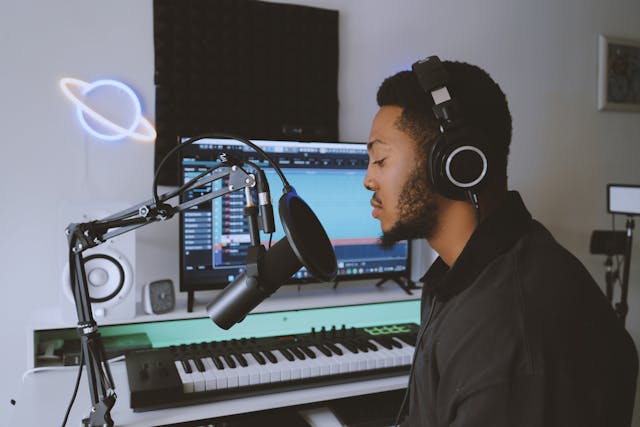
Recording great-sounding vocals is one of the most important and often most challenging parts of music production. Whether you are a singer, producer, or podcaster, the quality of your vocal recordings can make or break your project. Luckily, with the right setup, techniques, and mindset, you can capture professional-sounding vocals from almost any space.
In this guide, we’ll walk you through everything you need to know about how to record vocals for the best outcome—from preparing your environment to getting the perfect performance.
1. Prepare Your Recording Space
Before you hit record, your recording environment needs to be ready. Even the most expensive microphone can’t compensate for a noisy or echo-filled room.
-
Reduce background noise: Turn off fans, air conditioners, and other electronics that hum or buzz. Close windows to keep out traffic or outdoor sounds.
-
Minimize reflections: Bare walls and hard floors cause unwanted reverb. Use acoustic panels, rugs, or even heavy curtains to absorb sound.
-
Create a “dead” space: A dry recording (with minimal natural reverb) is easier to mix later. If you don’t have acoustic foam, hang duvets or blankets around your recording area to dampen reflections.
Your goal is to create a quiet, neutral environment where the microphone picks up only your voice.
2. Choose the Right Microphone
The microphone you use has a huge impact on your vocal sound. While there’s no single best mic for everyone, understanding the types helps you choose wisely.
-
Condenser microphones – These are ideal for studio vocals because they capture detail and brightness. They’re very sensitive, so use them in quiet rooms.
-
Dynamic microphones – Great for loud singers or untreated rooms. They’re less sensitive to background noise but may lack some high-frequency sparkle.
-
USB microphones – Convenient for beginners and podcasting. They’re plug-and-play but may not match the clarity of professional XLR microphones.
For most home studios, a large-diaphragm condenser mic like the Audio-Technica AT2020 or Rode NT1-A offers excellent results without breaking the bank.
3. Use a Pop Filter and Shock Mount
These two simple accessories can dramatically improve your recordings:
-
Pop filter: A mesh screen placed between you and the mic that reduces plosive sounds (like “p” and “b”). It also keeps saliva off the microphone capsule.
-
Shock mount: Holds the mic in suspension, isolating it from vibrations or knocks on the stand that might cause rumble in your recording.
Together, they help you achieve a clean, professional sound.
4. Set Proper Mic Placement
How you position the microphone matters just as much as the mic itself.
-
Start about 6 to 12 inches (15–30 cm) away from the mic.
-
Angle the mic slightly off-axis (not directly in front of your mouth) to reduce harsh consonants and breathing noise.
-
Adjust distance to control tone. Closer for warmth and bass, farther for clarity and space.
Experiment until you find the sweet spot that complements your voice.
5. Gain Staging and Levels
Proper gain staging ensures that your recording is clean and free from distortion.
-
Aim for input levels peaking around -12 dB to -6 dB on your meter.
-
Avoid clipping (hitting 0 dB), which causes harsh distortion that can’t be fixed later.
-
Record at 24-bit resolution if your interface allows. It provides more headroom and better dynamic range.
Remember, louder isn’t always better. It’s easier to raise volume in the mix than to fix a distorted take.
6. Warm Up and Perform Naturally
Your performance is the heart of a great vocal recording. Take a few minutes to warm up your voice before recording. Humming, lip trills, or gentle scales can loosen your vocal cords and improve control.
When performing:
-
Stay relaxed: Tension in your neck or shoulders can affect your tone.
-
Use emotion and dynamics: Great vocals convey feeling, not perfection.
-
Record multiple takes: Even professionals record several takes and later comp (combine) the best parts.
Don’t overthink it! Focus on delivering the emotion of the song rather than chasing technical perfection.
7. Monitor with Headphones
Always use closed-back studio headphones when recording vocals. This prevents your backing track or click from bleeding into the microphone.
Try to keep your headphone volume moderate. Too loud can cause singers to push their voice unnecessarily, while too quiet makes it hard to stay in tune.
8. Apply Subtle Processing When Necessary
If your recording setup allows, you can add light compression and EQ while recording to smooth out dynamics and enhance clarity. However, keep it subtle as over-processing can’t be undone.
Many engineers prefer to record vocals completely dry and apply effects like EQ, compression, and reverb later during mixing. This gives you more flexibility and control.
9. Review and Edit Thoughtfully
Once you’ve finished recording, take a break and then listen critically. Remove unwanted noises, tighten timing if needed, and select your best takes.
Use tools like crossfades to smooth transitions between takes, and ensure consistent volume across the performance. If you plan to mix yourself, keep processing gentle to preserve the natural tone of your voice.
Final Thoughts
Learning how to record vocals for the best outcome takes practice, patience, and a good ear. While professional studios have the advantage of top-tier gear and acoustics, you can achieve impressive results at home with the right techniques and attention to detail.
By focusing on your environment, using proper mic technique, and delivering a confident performance, you’ll capture vocals that sound clear, emotional, and professional and ready to shine in any mix.